Digital Ticket System for Dry Cleaners: 2026 Guide

A purpose-built dry cleaning customer ticket system digital platform is the fastest way to stop losing orders and free your counter staff for actual revenue work. For most shops, single-location or multi-location, Kansoflow is the recommended starting point: it runs on standard iOS devices, pairs natively with Star Micronics printers and Bluetooth scales, and gets a counter live in days, not months.
The immediate next step: run a 30-day pilot on one counter or one delivery route. Measure lost-item calls, average ticket turn time, and staff minutes per transaction. Those three numbers will tell you everything you need to know about ROI before you commit to a full rollout.
- Bottom line: A digital ticketing system reduces lost orders, automates customer notifications, and speeds counter workflows.
- Recommended solution: Kansoflow for shops that want a fast, low-friction deployment on existing iOS hardware.
- First action: Pilot one counter for 30 days. Track lost-item calls, ticket turn time, and staff time per order.
Pro Tip: Don’t pilot everything at once. Pick your highest-volume counter or your most complaint-prone route. The signal will be cleaner and the staff buy-in will be faster.
Table of Contents
- Why digital ticketing changes how your dry cleaning shop actually runs
- What features does a dry cleaning ticket management system need?
- How do you pick the right system for your shop?
- What does a realistic rollout actually cost and how long does it take?
- What does digital ticketing look like in practice?
- How Kansoflow maps to every item on the checklist
- Key Takeaways
- The part nobody tells you about going off paper
- Kansoflow is built for exactly this problem
- Sources and further reading
Why digital ticketing changes how your dry cleaning shop actually runs
Paper tickets work until they don’t. A misread tag, a lost stub, a phone call from a customer who can’t remember when they dropped off — these are daily friction points that compound across hundreds of orders a week. Modern dry cleaner software acts as a complete operational hub: tracking every garment, automating customer communication, and producing the data owners need to reduce costs and grow profit.

The operational gains show up fast. Order visibility means any staff member can answer “where is my order?” in seconds without touching a paper log. Automated SMS notifications cut inbound phone volume significantly. Garment-level tracking means fewer disputed claims and faster reassembly at pickup. One operator reported cutting lost-item claims significantly within six months after switching to barcode-based tracking.
Customer expectations have also shifted. People expect a text when their order is ready. They expect to check status online. When your shop can’t deliver that, it feels dated compared to the dry cleaner two miles away who can. Rising labor costs make this worse: you can’t afford to have a staff member fielding status calls that a $0.01 SMS could handle automatically.
The honest trade-off: technology dependence and staff retraining are real costs. AI-driven systems automate garment tracking, route optimization, and inventory reordering, but they replace manual steps your team has relied on for years. Expect a 2–4 week adjustment period. The shops that get through it fastest are the ones that run a hybrid workflow during the transition rather than flipping everything at once.
Stat callout: One operator example cited in industry research showed a 90%+ reduction in lost-item claims within six months of adopting barcode-based garment tracking.
What features does a dry cleaning ticket management system need?
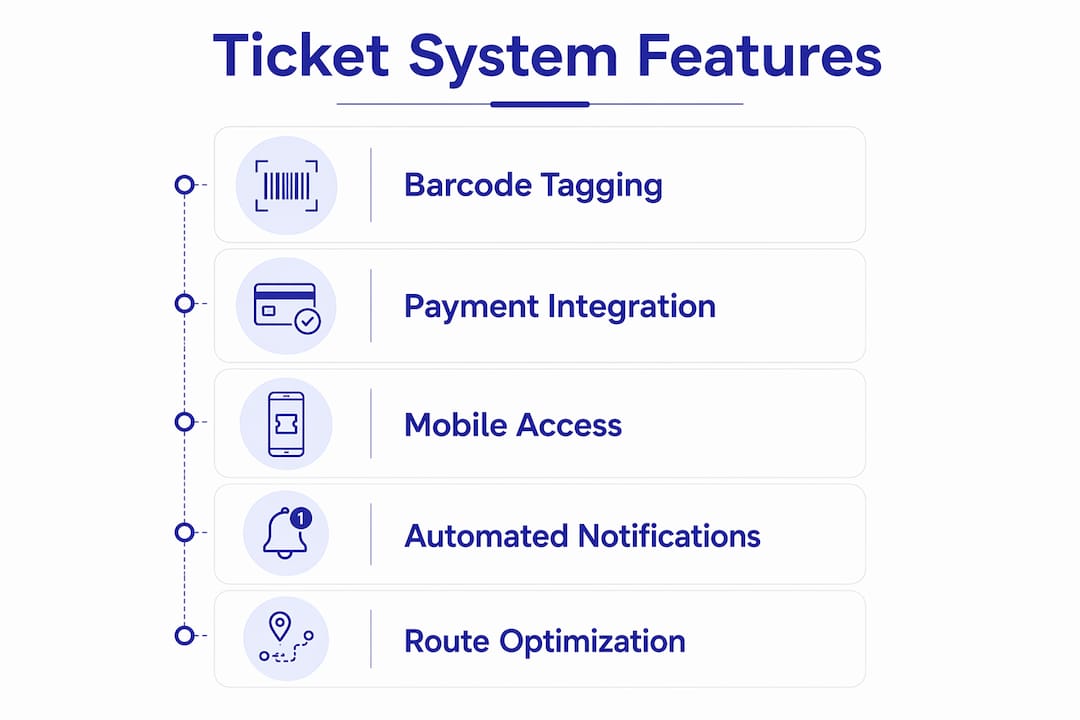
Not every system is built the same. Here is the prioritized checklist, with the operational problem each feature solves.
| Feature | Problem It Solves | Expected Benefit |
|---|---|---|
| Garment-level barcode/QR/RFID tagging | Lost items, misassembled orders | Fewer disputes, faster pickup |
| Photo intake at counter | Disputed damage claims | Documented condition on intake |
| Order lifecycle statuses | “Where is my order?” calls | Staff answers in seconds |
| Automated SMS/email notifications | Inbound phone volume | Fewer calls, faster pickups |
| Customer profiles and order history | Repeat-customer friction | Faster intake, upsell opportunities |
| Online booking and customer portal | After-hours order placement | More orders, less phone dependency |
| POS and payments (Stripe/Square) | Fragmented payment flow | Faster checkout, fewer errors |
| Driver app and route optimization | Fuel waste, driver inefficiency | Lower cost per delivery |
| Visual Kanban counter workflow | Staff confusion on order status | Faster throughput, fewer mistakes |
| Reporting and inventory analytics | Blind spots in cost and throughput | Better staffing and supply decisions |
| Bank-grade security and cloud backup | Data loss, unauthorized access | Business continuity, compliance |
Barcode, QR code, or RFID tagging that creates a unique identifier per item is the single most critical feature for preventing lost-item disputes and reassembling customer orders correctly. Everything else builds on top of that foundation.
On integrations, the mandatory list is short but non-negotiable. Systems need to connect to payment processors like Stripe or Square, receipt and tag printers like Star Micronics, and optionally accounting software for automated reconciliation. Bluetooth scale support matters for shops that price by weight. If a vendor can’t confirm these integrations before the demo, move on.
For mobile functionality, staff need a counter app that works at full speed on an iPad or iPhone — not a browser wrapper that lags on a busy Saturday morning. Customers need a portal or app to place orders, check status, and receive notifications. Both are table stakes in 2026.
How do you pick the right system for your shop?
The decision splits cleanly by operation type.

Single-location, counter-focused: Prioritize Kanban workflow speed, photo intake, and POS integration. Your bottleneck is counter throughput and lost-item disputes, not logistics.
Route or multi-location: Add driver app, route optimization, and centralized reporting to the must-have list. A dedicated driver app and route optimization materially reduce fuel and driver time by creating optimized manifests and turn-by-turn routes.
Multi-branch enterprise: Look for inter-branch garment transfer support, role-based access controls, and API integrations with your accounting stack.
Questions to ask every vendor before you sign
- What is the implementation timeline from contract to live counter?
- How many SMS messages are included monthly, and what is the overage rate?
- Which hardware is natively supported (printers, scales, payment terminals)?
- What is the backup and restore policy if data is lost?
- What onboarding and training resources are included?
- What is the SLA for support response during business hours?
Red flags that should end the conversation
- No garment-level barcode or RFID support
- No mobile driver app for route operations
- Weak or missing Stripe/Square integration
- Opaque pricing with undisclosed per-device fees
- No data export option (your data should always be yours)
On customization: most systems let you configure ticket templates, notification copy, and workflow stages. True custom development (unique pricing logic, bespoke integrations) is rare and expensive. Know the difference between configuration, which is fast and included, and customization, which usually costs extra and takes weeks.
What does a realistic rollout actually cost and how long does it take?
Pricing shapes to expect
Most digital ticketing platforms for dry cleaners use a flat monthly subscription per location, with SMS overages charged above an included monthly quota. Device fees are uncommon with cloud-native systems that run on standard iOS hardware. Hardware (printers, scales) is typically purchased separately or supported from existing equipment.
Single-location shops generally pay less per month than multi-location operators, with price influenced by SMS volume, number of devices, and whether custom integrations are needed. Always ask for an all-in monthly estimate that includes your expected SMS volume before comparing quotes.
Rollout timeline
Successful implementations follow a phased approach, starting with one automation component before expanding.
- Discovery (Days 1–5): Audit current ticket volume, hardware inventory, and staff count. Confirm hardware compatibility.
- Pilot setup (Days 6–10): Install on one counter or one route. Configure ticket templates, customer notification copy, and payment integration.
- Staff training (Days 10–14): Shadow shifts with a trainer or vendor support. Focus on intake, photo capture, and order status updates.
- Parallel run (Days 15–25): Run digital and paper side by side. Catch edge cases before full cutover.
- Full cutover (Day 30): Paper tickets retired. All orders in the digital system.
Pilot success checklist
- Lost-item calls per week (before vs. after)
- Average ticket turn time (intake to ready notification)
- Staff minutes per transaction at the counter
- Inbound phone volume for order status
- Customer pickup speed after ready notification sent
Staff retraining and phased adoption are common implementation costs. Mid-size operators often begin with automated notifications or garment tracking before moving to full automation. That sequence works.
What does digital ticketing look like in practice?
Scenario 1: Eliminating lost-item disputes at the counter
Before: A customer claims a shirt was lost. Staff search paper logs for 20 minutes. No photo exists. The shop eats the cost.
After: Photo intake at drop-off documents garment condition and location in the order. Staff pull up the record in seconds. Dispute resolved with photographic evidence.
- Time saved per dispute: 15–20 minutes of staff time
- Cost avoided: replacement or refund on undocumented claims
Scenario 2: Cutting inbound calls with automated notifications
Before: Customers call to check if orders are ready. One staff member handles 20–30 status calls on a busy day.
After: Automated SMS notifications fire when an order moves to “Ready.” Customers arrive knowing their order is waiting.
- Phone volume reduction: material drop in status calls
- Pickup speed: customers arrive faster, reducing rack congestion
Scenario 3: Route consolidation for delivery operations
Before: Driver uses a handwritten manifest. Stops are not optimized. Two hours of driving covers 12 stops inefficiently.
After: Driver app generates an optimized route. Same 12 stops covered in 90 minutes. Fuel savings compound weekly.
- Driver time saved per route: 20–30 minutes
- Fuel cost: reduced by eliminating backtracking
Scenario 4: Upselling through customer history
Before: Staff have no record of what a repeat customer typically orders. Every visit starts from scratch.
After: Customer profile shows order history, preferences, and last visit. Staff can suggest add-ons (starch, pressing, alterations) based on past behavior.
- Upsell conversion: higher when staff have context at intake
- Customer retention: repeat customers feel recognized
How Kansoflow maps to every item on the checklist
Kansoflow covers the core ticketing and customer-management features dry cleaners need and supports a fast pilot-to-live rollout on standard iOS hardware.
| Operational Problem | Kansoflow Feature | Outcome |
|---|---|---|
| Lost items and disputed claims | Photo intake at counter | Documented condition, disputes resolved with evidence |
| Order status confusion | Visual Kanban board (Wash, Fold, Dry Cleaning, Ready) | Any staff member sees order stage instantly |
| Inbound phone calls | Automated SMS customer notifications | Fewer calls, faster pickups |
| Counter payment friction | Stripe and Square integration | Fast checkout, card and contactless supported |
| Weight-based pricing errors | Native Bluetooth scale pairing | Accurate weight capture at counter |
| Tag and receipt printing | Star Micronics integration | Garment tags and receipts printed natively |
| Multi-branch order tracking | Inter-branch garment transfer support | Drop-off to processing hub without losing the order |
| Unauthorized staff access | Per-device PIN security | Quick lock and user switch on busy floors |
| Data loss risk | Bank-grade security, cloud sync | Business continuity, no local data dependency |
| Staff scaling | Unlimited team members | Add staff without per-seat cost surprises |
Kansoflow runs on iOS devices you may already own, which removes the hardware procurement delay that slows most rollouts. The full feature set covers garment-level tracking, photo intake, Kanban workflow, automated notifications, and payment processing in a single app.
30-day pilot example: A single-counter shop installs Kansoflow on one iPad at the front counter. Days 1–5: configure ticket templates and connect the Star Micronics printer. Days 6–14: staff shadow shifts, photo intake on every order. Days 15–25: parallel run with paper backup. Day 30: paper retired. KPIs to track: lost-item calls per week, average ticket turn time, and inbound status calls.
Pro Tip: During the pilot, assign one staff member as the “digital champion” — the person who troubleshoots edge cases and coaches others. That single role cuts training friction by more than any manual or video tutorial.
Key Takeaways
A purpose-built digital ticket system reduces lost orders, cuts inbound phone calls, and gives dry cleaning owners real-time visibility into every garment moving through their shop.
| Point | Details |
|---|---|
| Start with garment-level tagging | Barcode or QR tagging is the foundation; every other feature depends on it. |
| Automate notifications first | Automated SMS for “order ready” delivers the fastest reduction in inbound call volume. |
| Pilot before full rollout | A 30-day single-counter pilot gives you real data on lost-item calls and ticket turn time. |
| Match system to operation type | Counter-focused shops need Kanban speed; route operations need a driver app and route optimization. |
| Kansoflow for fast deployment | Kansoflow runs on standard iOS, pairs natively with Star Micronics and Stripe/Square, and goes live in days. |
The part nobody tells you about going off paper
The technology is the easy part. The hard part is the first two weeks when your most experienced counter staff feel slower than they did with paper. That feeling is real, and it passes, but only if you plan for it.
Most dry cleaning operators have built their workflows around personal relationships and muscle memory. A handwritten tag system that has worked for 15 years carries institutional knowledge that no software migration automatically captures. The shops that fail at digital rollouts are not the ones with bad software. They are the ones that treated the cutover as a technical event instead of a cultural one.
The practical mitigation is staged adoption. Hybrid approaches preserve personal customer relationships while automating routine tasks, and that is a legitimate long-term strategy for independent shops, not just a transition phase. You can automate notifications and garment tracking while keeping a handwritten note system for your VIP customers who prefer it. That is not a failure to commit to digital. It is smart operations.
A few cultural steps that actually reduce resistance:
- Run shadow shifts before the cutover, not after. Staff who practice on real orders before going live make fewer mistakes and feel more confident.
- Reward early adopters visibly. A small bonus or public recognition for the first staff member to complete 100 digital tickets without a paper backup goes further than any training session.
- Keep a VIP service path. Your top 20 customers probably account for a disproportionate share of revenue. Give them a direct line to a human, even after automation is live.
- Set a clear “paper-off” date and stick to it. Open-ended parallel runs drag on indefinitely and create confusion about which system is authoritative.
The honest truth: going digital costs you something in the short term. It costs staff comfort, it costs training time, and it costs the familiar rhythm of a system that everyone already knows. What you get back, order visibility, fewer disputes, automated communication, and real data, compounds over months and years in ways that paper never could.
Kansoflow is built for exactly this problem
Dry cleaning shops that want a fast, low-friction path from paper tickets to a full digital workflow have one real requirement: a system that runs on hardware they already own, trains staff in days, and doesn’t require a six-month implementation project.

Kansoflow is a native iOS POS and operations platform built specifically for laundromats and dry cleaners. It covers garment-level photo intake, visual Kanban order tracking, automated SMS notifications, Stripe and Square payments, Star Micronics printer support, and inter-branch transfer management in a single app. The pricing model is a flat monthly subscription per location, with SMS overages above the included monthly quota. No per-device seat fees. No proprietary hardware bundles.
The fastest way to evaluate it is a 30-day pilot on one counter. Visit the Kansoflow features page to see the full capability list, then start your pilot at kansoflow.com.
Sources and further reading
The findings below informed the claims and recommendations throughout this article. Citations are placed inline where each source directly supports a specific claim.
- Essential Features for Your Dry Cleaner Software — supports garment-level tagging requirements, automated notification benefits, driver app ROI, and the 90%+ lost-item reduction operator example.
- AI Operating System vs. Manual Processes in Dry Cleaning — supports automation benefits, hybrid adoption approaches, phased rollout recommendations, integration requirements, and staff retraining costs.
- Best Dry Cleaning Software: User Reviews from July 2026 — G2 category page for dry cleaning software; useful for independent user reviews and feature comparisons.
- Best Dry Cleaners Computer Software | 2026 Rankings — industry rankings and feature summaries for dry cleaning management platforms.
- Dry Cleaning Software Explained Through Real Operational Challenges — practical operational framing for how software addresses common shop problems.