Cleaning Software for Laundromats and Dry Cleaners
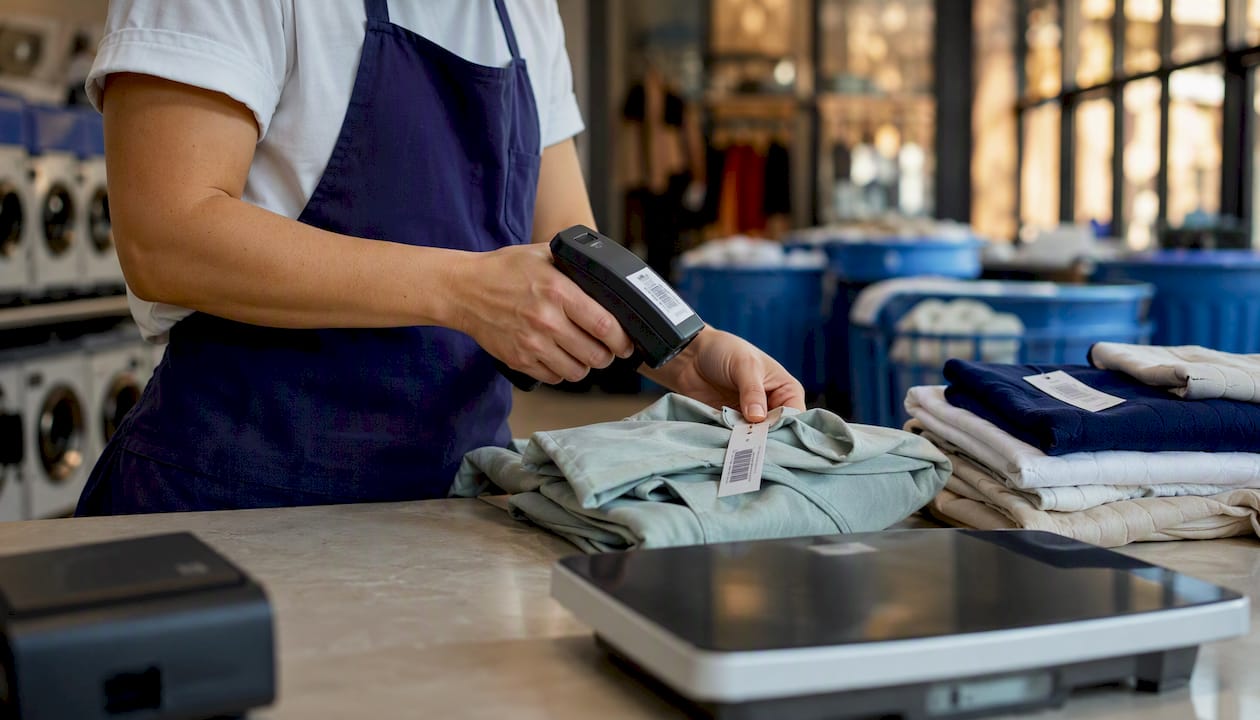
For most U.S. laundromat and dry-cleaner owners, Kansoflow is the right cleaning software to start with. It’s a native iOS POS built specifically for garment workflows, with Kanban order tracking, photo intake, Bluetooth scale and Star Micronics printer support, and Stripe/Square payments baked in. In this context, “cleaning software” means laundromat and dry-cleaner point-of-sale and operations software: order-stage workflow, photo intake, hardware integrations, payments, and reporting. Not scheduling apps for maid services. Not janitorial CRMs.
Your next step: book a demo with Kansoflow, bring your machine count and whether you run attended or unattended workflows, and run a 7-day parallel test on one counter station before committing.
- Kansoflow covers single-store WDF, dry-clean, hybrid, and multi-location operations
- Works on standard iOS devices, no proprietary hardware bundles required
- Flat monthly fee per location, plus SMS overages beyond the included quota
- Available on the App Store
Table of Contents
- What does cleaning software actually do on the shop floor?
- Must-have features for laundromat and dry-cleaner software
- How do you choose between single-store and multi-location software?
- Implementation quick wins: your 30–90 day pilot plan
- Why Kansoflow is the recommended cleaning software for U.S. laundromats
- How does your software handle supply and parts inventory?
- Does cleaning management software integrate with accounting and payroll?
- Compliance, data privacy, and what you’re responsible for
- What support and training should you expect from a vendor?
- Key Takeaways
- The real reason counter speed gets overlooked
- Kansoflow: what the demo covers and how pricing works
- Selected sources and where to learn more
What does cleaning software actually do on the shop floor?
A garment order touches more systems than most owners realize before they go digital. The lifecycle runs: customer intake → photo capture and tag printing → wash, dry, or dry-clean stage → assembly → ready-for-pickup or delivery → payment and receipt. Each handoff is a point where garments get lost, disputes start, or staff waste time hunting for an order.
Modern laundromat software centralizes payments, remote machine monitoring, pricing control, loyalty, and reporting so owners can operate without being on-site constantly. The garment POS side handles per-piece pricing, barcode or heat-seal tagging, and the Kanban board that shows every order’s stage at a glance.
There’s an important split here. A laundromat tech stack typically divides into two cores: a machine-payment and remote-monitoring stack for unattended self-serve floors, and a garment-tracking POS for dry-clean and WDF workflows. Operators running both often stitch two systems together. Knowing which side your shop leans toward shapes every feature decision you make.
Real-world problems the right software solves:
- Lost garments and he-said-she-said disputes at pickup
- Payment errors on multi-piece orders with complex pricing
- Machine downtime you find out about from a customer, not a dashboard
- No visibility into which orders are stuck in production
Must-have features for laundromat and dry-cleaner software
Not every feature list is equal. Prioritize by what breaks first in your shop.
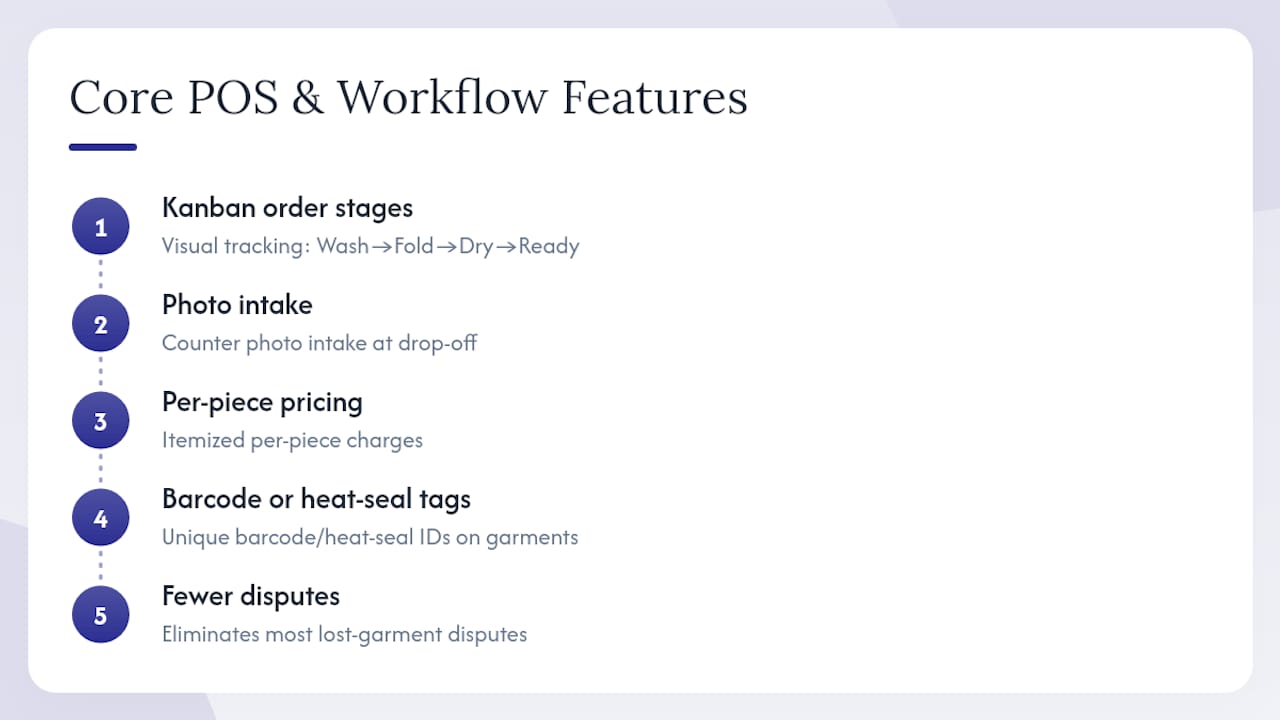
Core POS and order workflow: Kanban-style order-stage tracking (Wash, Fold, Dry Cleaning, Ready), photo intake at the counter, per-piece pricing, and barcode or heat-seal tagging. These four together eliminate most lost-garment disputes before they start.
Payments and hardware: Stripe or Square integration for card processing, Bluetooth scale support for weight-based pricing, and Star Micronics receipt and tag printer compatibility. For delivery-first WDF operators, dedicated pickup-and-delivery platforms add driver routing and proof-of-delivery apps.
Operations and reporting: Real-time order visibility, centralized multi-store reporting, inter-branch garment transfers between drop-off locations and processing hubs, and maintenance tracking. Cloud-based delivery dominates multi-store operations for good reason.
Customer engagement: Automated SMS and email order-status updates, and pickup-and-delivery routing tools. Customers who get a “your order is ready” text before they call are customers who come back.
Security and admin: Per-device PIN access for fast staff switching on busy floors, granular role controls, bank-grade cloud security, and automatic data backup.
How do you choose between single-store and multi-location software?
Match your business model first
| Shop model | Top software priority |
|---|---|
| Unattended self-serve only | Machine-payment depth, telemetry alerts, remote pricing |
| Attended WDF or dry-clean | Kanban workflow, photo intake, per-piece pricing, tag printing |
| Hybrid (machines + garment counter) | Both cores; evaluate integration depth carefully |
| Delivery-first WDF | Route engine, driver app, proof-of-delivery, customer app |
| Multi-location / franchise | Centralized reporting, inter-branch transfers, franchise billing |
All-in-one platforms exist but often provide lighter machine-payment depth than dedicated card systems. Choose all-in-one only when your machine-payment needs are moderate and your garment workflow is the revenue driver.
Vendor questions to ask on every sales call
- Which receipt and tag printers do you support natively, and which require workarounds?
- How are SMS overages priced, and what’s the included monthly quota?
- Does inter-branch garment transfer require an add-on or is it in the base plan?
- What’s your onboarding timeline, and do you provide hands-on setup support?
- Can I export raw transaction data, and do you offer API access?
- What happens to my data if I cancel?
Red flags to walk away from
- Opaque per-transaction fees buried in the contract
- No native Kanban or order-stage workflow
- Hardware locked to proprietary bundles
- No cloud backup or data portability
- Reporting limited to a single location with no multi-store rollup
Pricing signals: Expect a flat monthly subscription per location plus usage-based SMS charges. Hardware costs (scales, printers) are typically separate. Budget a few weeks for pilot setup, about two months for full staff adoption, and around three months for your first clean performance review.
Implementation quick wins: your 30–90 day pilot plan
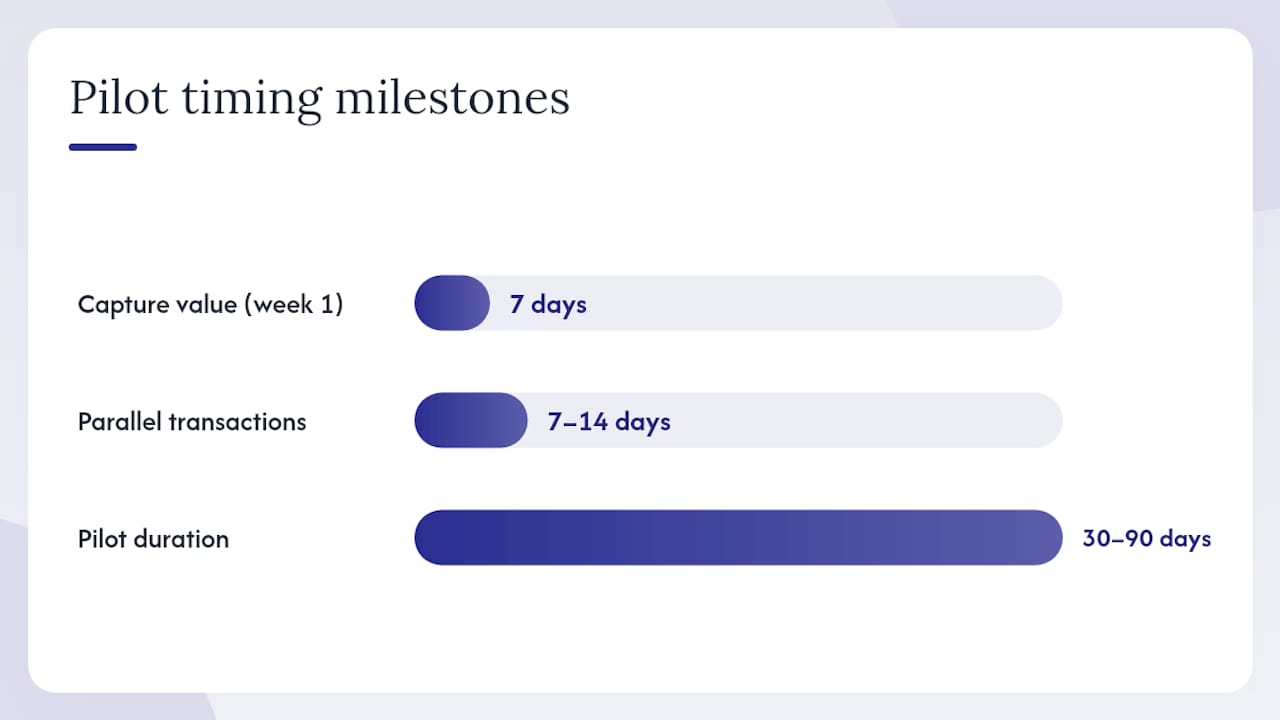
Speed matters. The goal is to capture value in week one, not month three.
- Choose one counter station or a single delivery route for the pilot. Don’t try to flip the whole shop at once.
- Enable photo intake on day one. Every order photographed from launch means zero disputed garments from that point forward.
- Turn on automated SMS notifications. Customers get a “ready” text; your staff stops answering “is my order done?” calls.
- Run parallel transactions for 7–14 days. Keep your old process as a fallback while staff builds confidence.
- Set maintenance telemetry alerts for your highest-revenue machines before week two ends.
Training checklist for staff:
- Per-device PIN setup and user-switching drill
- Attendant app walkthrough: intake, tag print, stage move
- Barcode and heat-seal tagging process for dry-clean items
- Morning shift checklist: open orders, machine status, pending pickups
- Refund and void workflow
Preventive maintenance scheduling and work-order automation shift operations from reactive to proactive, protecting daily revenue in high-traffic stores. Logging parts usage into the system also builds a repair history that cuts diagnostic time when something breaks.
Pro Tip: Set up PIN access and the Kanban board before your first live shift. Counter speed drops when staff are learning two new things at once. Get the security and workflow muscle memory in place first, then layer in photo intake on day two.
Scheduling and maintenance workflows improve repeat business and reduce emergency repair costs when paired with digital scheduling tools, a pattern that holds across service-intensive operations.
Why Kansoflow is the recommended cleaning software for U.S. laundromats
Kansoflow’s feature set maps directly to the must-have checklist above:
| Must-have feature | Kansoflow capability |
|---|---|
| Kanban order-stage tracking | Visual drag-and-drop board: Wash, Fold, Dry Cleaning, Ready |
| Photo intake and claims mitigation | Instant counter photography, stored per order |
| Hardware integration | Native Bluetooth scale and Star Micronics printer support |
| Payment processing | Stripe and Square, including park-and-resume transactions |
| Multi-location operations | Inter-branch transfers, centralized reporting, franchise billing |
| Staff security | Per-device PIN, quick user switching, granular roles |
| Cloud sync and backup | Bank-grade security, automatic sync across all devices |
| Unlimited team members | No per-seat fees for staff accounts |
It runs on standard iOS devices, so you’re not buying proprietary hardware. A single-store WDF counter, a hybrid laundromat with a dry-clean drop-off, and a multi-location franchise roll-up all run on the same platform. For the franchise use case specifically, inter-branch garment transfers between drop-off locations and processing hubs are built in, not bolted on.
To trial it: define your pilot scope before the demo. Know your machine count, whether you run attended or unattended workflows, and whether you need delivery routing. That 15-minute prep makes the demo conversation twice as useful.
How does your software handle supply and parts inventory?
Consumables add up fast: detergent, poly bags, hangers, solvent, tags, and replacement parts for washers and dryers. A platform that logs parts usage per work order builds a real cost-per-order picture over time. You stop guessing whether that drum bearing is eating into margin and start seeing it in the data.
Workflow automation platforms use IoT sensors and connected systems to automate inventory tracking alongside equipment monitoring, shifting operations from reactive to proactive. At minimum, your software should let you log supply consumption per shift and flag reorder thresholds before you run out mid-week.
Does cleaning management software integrate with accounting and payroll?
It should, and the integration depth is worth asking about explicitly. At minimum, look for export compatibility with QuickBooks or Xero for revenue reconciliation. Payroll integrations with platforms like Gusto or ADP matter more as you add locations and staff. An API or CSV export is the fallback when a native connector doesn’t exist.
Ask vendors specifically: does your platform push daily sales summaries to my accounting software automatically, or do I export manually? The answer tells you a lot about how the product was built.
Compliance, data privacy, and what you’re responsible for
U.S. laundromat and dry-cleaner operators collecting customer data, processing card payments, and storing garment photos carry real compliance obligations. PCI DSS compliance covers card data; your payment processor (Stripe or Square) handles the heavy lifting there, but your POS must not store raw card numbers. State-level data privacy laws vary, so confirm your vendor’s data residency and deletion policies in writing.
For dry-cleaning specifically, solvent handling and environmental reporting fall under EPA and state regulations, separate from your software stack entirely. Your cleaning management tools don’t replace those obligations, but a platform with solid audit trails and data export makes compliance documentation easier.
This is general information, not legal or compliance advice. Confirm current requirements with a qualified professional or the relevant regulatory body for your state.
What support and training should you expect from a vendor?
Onboarding quality separates platforms that get adopted from ones that collect dust. Before signing, ask for a structured onboarding plan in writing: what’s covered in week one, who your contact is, and what the escalation path looks like when something breaks on a Saturday morning.
Video tutorials, a searchable knowledge base, and live chat support are table stakes. Kansoflow publishes hands-on tutorials at YouTube so staff can self-train on specific workflows without waiting for a support ticket. For multi-location rollouts, ask whether the vendor provides dedicated onboarding calls per location or a single kickoff and then hands you documentation.
Key Takeaways
The right cleaning management software for a U.S. laundromat or dry cleaner is the one that matches your shop’s scale, workflow type, and hardware before it matches your feature wishlist.
| Point | Details |
|---|---|
| Match software to your shop model | Unattended self-serve needs machine-payment depth; attended WDF and dry-clean needs Kanban and photo intake. |
| Pilot before full rollout | Run one counter station or route for 7–14 days in parallel before switching the whole shop. |
| Prioritize Kanban and photo intake | These two features eliminate most lost-garment disputes and production bottlenecks from day one. |
| Watch for opaque pricing | Flat per-location subscriptions with clear SMS overage rules are the cleaner model; hidden per-transaction fees compound fast. |
| Kansoflow fits most U.S. operators | Native iOS, no proprietary hardware, built-in inter-branch transfers, and flat per-location pricing make it the practical starting point. |
The real reason counter speed gets overlooked
Most operators evaluating cleaning service software focus on the feature list and miss the thing that actually determines adoption: how fast an attendant can complete an intake on a busy Saturday morning. A platform with 40 features that takes 90 seconds per order will get abandoned. One with 12 features that takes 20 seconds will stick.
That’s the design logic behind Kansoflow. Per-device PIN switching means a new attendant can take over a counter in seconds without logging out and back in. The Kanban board shows every order’s stage without a search. Photo intake happens at the counter in one tap. The hardware integrations with Bluetooth scales and Star Micronics printers mean weight-based pricing and tag printing don’t require a workaround.
Operators who’ve moved from paper tickets to a visual workflow board consistently report the same thing: the board doesn’t just organize orders, it exposes the bottlenecks you didn’t know you had. An order sitting in “Wash” for six hours is invisible on paper. On a Kanban board, it’s obvious.
Kansoflow: what the demo covers and how pricing works
Kansoflow runs on a flat monthly subscription per location, plus SMS overages beyond your included monthly quota. No per-transaction fees. No proprietary hardware bundles. You use the iOS devices you already own or standard iPads.
Before your demo, note your machine count, whether you run attended or unattended workflows, and whether you need delivery routing. That prep makes the conversation specific to your shop, not a generic product walkthrough. Onboarding typically runs 30–90 days depending on location count and workflow complexity.
Download the app directly from the App Store, or review the full feature specs and demo options before you book. If you want to start at the top, kansoflow.com has pricing details and a direct line to the team.
Selected sources and where to learn more
- What is the best tech stack for a laundromat or dry cleaning…
- Software for Laundromats: Tools for Smarter Operations
- What Is Workflow Automation in Laundromat Chains? | AI Business OS
- 7 best dry cleaning software for 2026 - Guideflow Blog
- Best Work Order Software for Maintenance Teams in 2026
- Aircon cleaning leads: a practical guide for operators
When evaluating any vendor, prioritize operational-fit evidence over feature lists: ask for case studies from shops with your model, request a pilot scope in writing, and test counter speed under real Saturday-morning conditions before you commit.